

Use a phone repair store directory to locate nearby stores and review their listed hours before you visit. Location and operating hours help you narrow the options to places that fit your area and schedule, while store details can help you decide which listing to explore. You can use this guide to find nearby repair locations, read store-hour information, and consider location and schedule when choosing where to book, so you can plan your next step with the relevant details in view.
Key Takeaways
- Use location and store-hour details to narrow nearby options and plan a visit.
- Review a store’s listed phone types and repair services to identify relevant options.
- Check how a store handles walk-ins and same-day requests before choosing how to proceed.
- Compare review details and warranty terms, then use Find Store or Book to take the next step.
Nearby repair store location
A phone repair store directory can help you find repair options by ZIP code. Compare each listing’s address, operating hours, supported devices, and appointment details before making the trip. Hours can differ between locations in the same chain, so check the listing for the specific store you plan to visit. Distance and opening hours help you choose an option that fits your route and schedule.
Are local repair shops authorized by Apple, Samsung, or other manufacturers? Authorization depends on the individual store. A listing for iPhone, Google Pixel, or Galaxy repairs does not establish manufacturer authorization. Treat independent repair and authorized service as distinct descriptions. Look for clear information about the store’s status rather than inferring it from the brands or repair services listed.
Before visiting, note your phone model and describe the fault, such as a cracked screen or charging problem. Back up any data you need, then follow the store’s device-preparation instructions. Remove personal accessories, such as a case, if requested. Sharing the precise model and symptoms helps the store understand your repair request and distinguish versions that may use different parts.
Independent repair can differ in parts, workmanship, and warranty coverage. Read the store’s written terms, including exclusions that apply to your repair. Mail-in and mobile options vary by store and location, so look for these formats in the individual listing rather than assuming a storefront offers them. A listing for PlayStation or Nintendo Switch repairs does not establish that the store also repairs phones.
What warranty do stores provide on parts and labor? Terms vary by store and repair. Written terms should state whether coverage applies to parts, labor, or both, and explain its duration and exclusions. For example, screen-replacement coverage may not apply to unrelated damage. Read the terms for the repair you are considering, including how the store handles follow-up if a covered issue occurs.
What types of phones and repairs do local phone repair stores handle?
Store listings often group phones by manufacturer and model, including Apple iPhone, Samsung Galaxy, Google Pixel, Motorola, and OnePlus devices. The exact model matters because screens, connectors, and internal layouts can differ. Match the model name in the listing to the one shown in your phone’s settings or device information.
Repair categories may include screen or battery work, charging problems, camera faults, and speaker issues. A cracked iPhone screen is a different request from a Galaxy that will not charge. Read the listed repair categories alongside device coverage, rather than relying on a broad label such as “phone repair.” Clear descriptions help distinguish visible damage from issues involving buttons, microphones, or power.
Some listings identify foldable phones or specific product lines separately. For example, a Samsung Galaxy Z has a foldable display that differs from a standard Galaxy phone. Model-specific categories can help you find a listing for the device you own. The same applies to older models, which may appear separately from newer releases.
Software and hardware concerns call for different repair descriptions. A phone that freezes during startup may need assessment for a software issue, while a damaged charging port involves a physical component. Listings may describe diagnostics or services by issue. Use the closest matching category to understand the store’s stated scope.
Before choosing a listing, note the manufacturer, full model name, and main symptom. For example, record whether your Google Pixel has a cracked screen, camera fault, or charging problem. Compare those details with the store’s device and repair categories. This helps you avoid choosing a listing that covers your brand but not your model or repair need.
Do phone repair stores offer same-day or walk-in service?
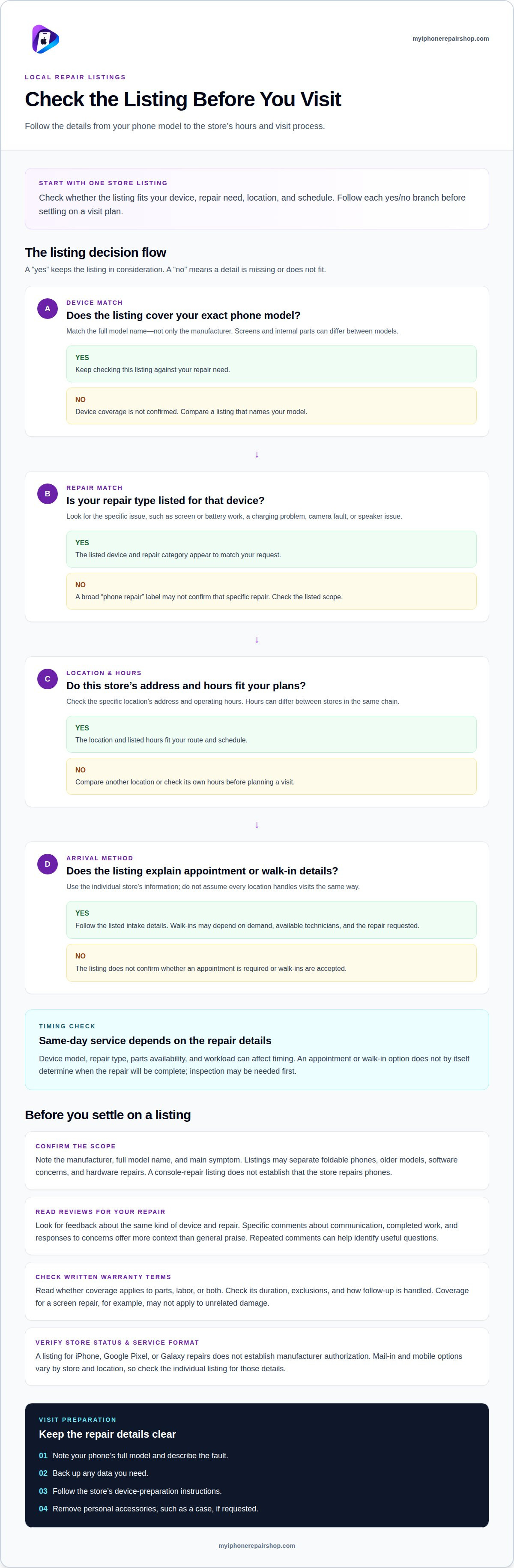
Some phone repair stores accept walk-ins, while others arrange visits by appointment. A walk-in lets you bring an iPhone or Samsung Galaxy to a location without booking ahead, but the process can depend on demand, available technicians, and the repair requested. Listings may indicate whether appointments are available or required.
Same-day service depends on the device, repair type, parts, and workload. Replacing the screen on a common model may follow a different process from diagnosing a phone that will not power on. Repairs involving several faults can require more assessment. The store’s listed hours also indicate when it can receive devices.
Parts availability can affect the schedule. A store may need a specific screen or charging component for your phone model. Providing the model helps the store identify the required parts and assess your repair request. A Google Pixel and an older Samsung Galaxy can need different components, even when both have cracked screens.
Appointments provide a scheduled arrival time, while walk-ins follow the store’s intake process. Neither option alone determines when a repair will be complete. A technician may need to inspect the phone before confirming the work and expected timing. A damaged screen accompanied by other symptoms may need additional testing.
Before choosing how to visit, review the listing for appointment details and repair categories. Note your phone’s manufacturer, model, and main problem. For example, describe an iPhone with a cracked screen or a Galaxy with a charging issue. This information helps the store arrange the visit and assess the repair.
How can a phone repair store directory help you compare reviews and warranties?
Use store listings to compare feedback about the repair you need, not just general ratings. For an iPhone screen repair, look for reviews describing display replacement, communication, and the completed work. Specific comments provide more context than brief praise or complaints. Recent feedback can also show whether customers describe consistent service over time.
Read how reviewers describe problems and how the store responds. A review about a Samsung Galaxy charging issue is more relevant to that repair than one about a different device. Look for clear explanations, updates during the process, and responses to concerns. Repeated comments about the same issue can help you identify useful questions.
Read warranty terms just as carefully. Compare whether coverage applies to parts, labor, or both, and check the stated duration, exclusions, and process for requesting follow-up service. For example, a warranty might cover a replacement screen but exclude unrelated damage. The written terms clarify what applies to the specific repair.
Do not assume two stores use the same warranty language. One listing may describe parts coverage, while another explains labor coverage separately. Compare those differences alongside the review details. Clear conditions are easier to assess than a broad statement that leaves coverage unclear. Keep the repair type and phone model consistent throughout your comparison.
A practical comparison focuses on three details: relevant review comments, repair-specific warranty coverage, and how clearly the store explains its terms. For a Google Pixel camera repair, prioritize feedback and coverage related to camera work. This helps you assess the available information without treating a general rating as proof of a particular repair outcome.
IPhoneRepairShop
When you are ready to move from comparing listings to choosing a store, iPhoneRepairShop offers Find Store to locate repair options and Book to continue with a booking. The platform brings store listings and repair requests together, giving you a place to proceed after reviewing location, hours, device coverage, and warranty terms.
Use store details to narrow the options that fit your situation, such as a listing that covers your phone model and repair type. When you are ready to schedule through the platform, Book provides a next step. The store is the repair provider, while iPhoneRepairShop connects your search with a repair option.
Store owners can use List Your Store to add their business to the directory. This gives repair stores a way to present their location and services to people looking for repair options. The platform organizes listings and repair requests to help readers and stores connect around repair needs.
iPhoneRepairShop organizes store listings and repair requests to help you move from general research to a location, relevant repair category, or booking step. Use the platform to continue your search, then review the store’s own details for the service you need. Directory information is not a guarantee of a particular repair outcome. The team’s experience with repair directories helps connect readers and stores.
Contact iPhoneRepairShop to discuss your directory needs.
Frequently Asked Questions
How can I find phone repair stores near me?
Use Find Store to start locating repair options near you. Search around where you need service, such as near home, work, or a planned stop. If your immediate area has limited options, widen the search. Consider your travel plans and whether carrying a damaged device affects your route.
How can I find a reputable phone repair store in my city?
Look for a clear repair intake process. The store should record the reported problem and note the phone’s condition before work begins. Make sure you understand what the proposed repair covers and approve the work before it proceeds. For example, if your phone has both a cracked display and a camera fault, ask that each concern be documented separately.